MapLink OGC Services SDK
The MapLink OGC Services library was introduced in MapLink 6.0 and superseded the previously used frontend API of the MapLink Web Map Service (WMS). It was introduced to allow additional OGC Service implementations to be created and used through the same interface.
The SDK offers interfaces in C++, .NET and JAVA for the construction, configuration and use of the MapLink OGC Services. Currently the following services are offered by MapLink:
-
The MapLink Web Map Service (WMS)
-
The MapLink Web Processing Service (WPS)
It is intended that future versions of MapLink will offer additional services
An OGC Services Implementation, such as the MapLink WMS, is loaded as a plug-in to the MapLink OGC Services SDK at runtime.
The “MapLink OGC Services Deployment Guide” provides the most comprehensive instructions on deploying and configuring all the MapLink OGC Services. This section is intended to cover programming using the SDKs provided.
Library Usage and Configuration
The table below describes the pre-processor directives and link options that should be set in the Project Properties for using the MapLink OGC Service C++ API. For X11 targets, refer to the product Release Notes.
MapLinkOGCServices64.lib Release mode, DLL version. Uses Multithreaded DLL C++ run-time library. Requires TTLDLL preprocessor directive. No redistributable run-time available. KEYED: Deployment machines only.
The MapLink WMS
The MapLink Web Map Service (WMS) is used to serve up user defined map data in a standardised format for use by client software across a network. It conforms to the ‘Open Geospatial Consortium’ (OGC) WMS standard version 1.3.0 but is also backwards compatible with all prior ratified versions.
Envitia supplies two types of installation of this component; a developer and a deployment version. The developer installation includes the debug versions of the WMS libraries to allow users to create their own plug-ins to serve custom data. Whereas the deployment installation includes the release versions of the libraries for deploying a MapLink WMS using the pre-built or user created plug-ins.
The “MapLink OGC Services Deployment Guide” provides instructions on how to deploy and configure your MapLink WMS on a variety of proprietary web servers. This section of the guide will cover the basic steps for creating your own plug-in to serve your own data.
Philosophy
As outlined in the OGC Services Deployment Guide, a WMS plug-in supplies the MapLink WMS with one or more data sources through its relationships to spatial data. A data source is the term hereafter used to refer to a child layer of the root layer in the WMS capabilities of the service. This is defined through a named combination of plug-in type and spatial data.
A single plug-in could potentially be used to serve the same spatial data in two different ways, thus creating two separate data sources. In practice, however, it is usually the case that a plug-in will be used to create separate data sources only when using different spatial data.
A good example of the use of a plug-in is the BasicMapPlugin supplied with the MapLink WMS. For spatial data it takes MapLink Maps, creating a different data source for each map.
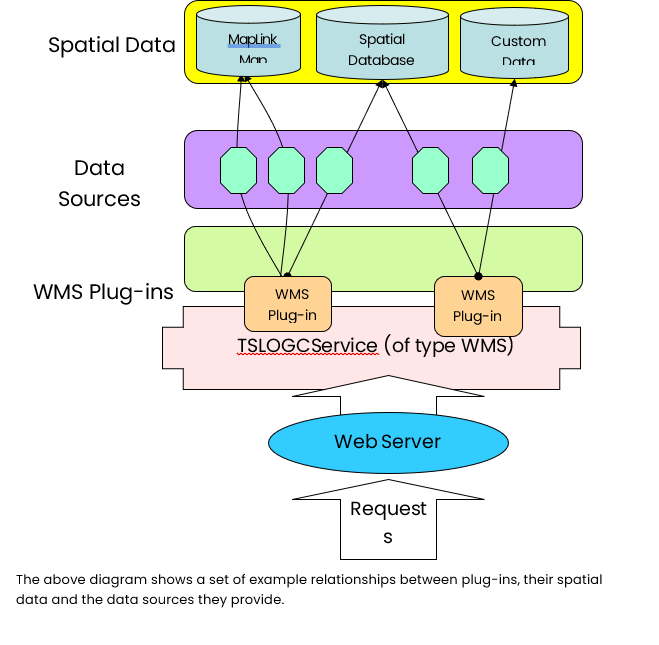
The above diagram shows a set of example relationships between plug-ins, their spatial data and the data sources they provide.
Configuration
When the MapLink WMS starts up, it loads a single global configuration file that contains details of its root WMS capabilities as well as the data sources it is to load. The exact contents of this file are described in the OGC Services Deployment Guide, but this section will cover what details are passed to the plug-in.
Each data source is configured with three string entries in this global file; the plug-in name, the spatial data string and the data source configuration string. The MapLink WMS ignores the content of the latter two and only concerns itself with the former. It attempts to load the library of the plug-in name, appending ‘64’ to the name when running in 64-bit mode and/or ‘d’ in debug, then queries the library for its createDataSource function.
If it fails to find this function, then the service will abort its loading and queries to the service will return a WMS exception report. If it’s successful, it will pass the spatial data and data source configuration strings to this create function.
Library Usage and Configuration
Unlike most MapLink SDKs, when creating a custom WMS plug-in, the only library that must be linked against is the core WMS library. The table below describes the pre-processor directives and link options that should be set in the Project Properties for using the MapLink WMS SDK. For X11 targets, refer to the product Release Notes.
MapLinkWMS64.lib Release mode, DLL version. Uses Multithreaded DLL C++ run-time library. Requires TTLDLL preprocessor directive. No redistributable run-time available. KEYED: Deployment machines only.
Plug-In Writing
As mentioned in the previous section, all WMS plug-ins must implement and export the createDataSource function for use by the MapLink WMS. An example of this is shown below.
#include "tslwmsplugindllspec.h"

#include "mydatasource.h"

extern "C"

{

TSLWMSPluginDataSource* createDataSource( const char* spatialData,

const char* dataSourceConfig )

{

try

{

return new MyDataSource(spatialData, dataSourceConfig);

}

catch (...)

{

return NULL;

}

}
}
The user-created plug-in should return an implementation of the abstract TSLWMSPluginDataSource class from the createDataSource function. The two abstract methods are the getLayers and getMap functions which must be implemented. Optionally the derived class may override the getFeatureInfo function if the plug-in is to support ‘GetFeatureInfo’ WMS requests.
The getLayers function is called immediately after the data source is created to build up the capabilities of the service. The data source should create and populate at least a root TSLWMSAvailableLayer object and potential sub layer objects. The MapLink WMS will internally handle how these objects are serialised to XML during the WMS ‘GetCapabilities’ requests. The TSLWMSRegister object passed to the getLayers function is for use when overriding the getFeatureInfo function and is discussed later in this section. The TSLWMSRequest object passed to the getLayers function is for advanced usages and is discussed in the class documentation.
The getMap function is called whenever a WMS ‘GetMap’ request is made to the service. The data source implementation should examine the TSLWMSGetMapRequest object and populate the TSLWMSGetMapResponse object with its response. Currently the MapLink WMS only supports raster responses to ‘GetMap’ requests, but in future releases it is intended to additionally support vector responses.
For raster ‘GetMap’ requests, the response object should be cast up to the platform specific raster response object using the isRasterResponseNT and isRasterResponseX11 as shown in the following example. The user can then either access the raster resource that this object represents or request a MapLink drawing surface based on the resource. Users should not create drawing surfaces independently due to thread safety issues discussed later in this section.
In the following example a pseudo implementation of these functions is provided.
TSLWMSAvailableLayer * MyDataSource::getLayers (TSLWMSRegister *wmsRegister, const TSLWMSRequest* r)
{

if ( !m_isConfigurationValid )

{

TSLWMSExceptionReport * report = new TSLWMSExceptionReport();

TSLWMSCustomException * exception = new

TSLWMSCustomException("MyDataSource not configured correctly");

report->addException(exception);

report->throwException();

}

TSLWMSAvailableLayer * rootMapLayer = new TSLWMSAvailableLayer();

//TODO: Build up layer tree

return rootMapLayer;

}
bool MyDataSource::getMap (TSLWMSGetMapResponse *response,
const TSLWMSGetMapRequest *request)
{

if ( !m_isConfigurationValid )

{ //TODO: Throw exception report }

#ifdef WINNT

TSLWMSGetMapRasterResponseNT * res =

TSLWMSGetMapRasterResponseNT::isRasterResponseNT(response);

#else

TSLWMSGetMapRasterResponseX11 * res =

TSLWMSGetMapRasterResponseX11::isRasterResponseX11(response);

#endif

if ( !res )

{

//TODO: Throw exception report

return false;

}

#ifdef WINNT

//TODO: Draw to response using either res->getHDC()

//or res->getDrawingSurface()

#else

//The implementation uses the DISPLAY environment variable for the

//connection information.

//Supported Visuals: True Color 24,16 and 8 bit depth, 8 bit Psuedo

//Color.

//TODO: Draw to response using res->getDrawable/Display/Screen/

//Colourmap/Visual() or res->getDrawingSurface()

#endif

return true;

}
‘GetFeatureInfo’ Usage
If any of the layers returned from the getLayers query to the data source have their ‘Queryable’ flag set to true, then the MapLink WMS expects the data source to provide an overridden implementation of the getFeatureInfo function. Failure to do so will lead to an exception report being generated if a service user performs a WMS ‘GetFeatureInfo’ request to that layer.
Unlike ‘GetMap’ requests, the MapLink WMS does not define any limitation on the type of response that a custom plug-in returns from a ‘GetFeatureInfo’ request. The only restriction it puts in place is that ‘GetFeatureInfo’ requests cannot query layers, in a single request, from multiple data sources. This is due to the MapLink WMS having no understanding of the response and is therefore not able to merge multiple responses together as it does for ‘GetMap’ responses.
Plug-ins that wish to serve ‘GetFeatureInfo’ requests must register their supported output formats with the TSLWMSRegister object passed to the getLayers function at service start-up. Registered output formats will appear in the service level metadata returned from ‘GetCapabilities’ requests.
The getFeatureInfo method will be passed a TSLWMSGetFeatureInfoResponse object which it should populate with the raw data of the response.
The MapLink WPS
A Web Processing Service (WPS) provides a set of ‘Processes’, usually geospatial in nature, which take zero or more inputs and return one or more outputs. The WPS standard describes a process as ‘any algorithm, calculation or model that operates on spatially referenced data’, although its interface is not limited to geospatial operations. The WPS standard also provides an interface which will describe all processes WPS service.
Envitia’s implementation of the WPS standard allows developers to build WPS plug-ins, each which can provide one or more WPS Processes. Each Process is defined as a class which inherits the ‘MapLink WPS Data Source’ class. The MapLink WPS Data Source class provides low level functionality which will interface with Envitia’s WPS, allowing for the developer to concentrate on implementing the process itself.
Envitia supplies two types of installation of this component; a developer and a deployment version. The developer installation includes the debug versions of the WPS libraries, whereas the deployment installation includes the release versions of the libraries.
The ‘MapLink OGC Services Deployment Guide’ provides instructions on how to deploy and configure your MapLink WPS on a variety of web servers. This section of the guide will cover the basic steps for creating your own plug-in to serve your own data.
Library Usage and Project Configuration
When creating a custom WPS plug-in the table below describes the pre-processor directives and link options that should be set in the Project Properties for using the MapLink WPS SDK.
MapLinkWPS64.lib Release mode, DLL version. Uses Multithreaded DLL C++ run-time library. Requires TTLDLL preprocessor directive. No redistributable run-time available. Your application must also link: - MapLink64.lib - MapLinkwps64.lib - MapLinkows64.lib
Configuration
The WPS configuration file is used to define what WPS plugins exist. The contents of WPS configuration file is detailed in the OGC Services Deployment Guide. Each plugin is declared with three string entries:
-
plug-in
-
data path
-
config path
The ‘plugin’ value defines the name of the DLL library to dynamically load.
The ‘data path’ and ‘config path’ are values that are passed to the plugin on start-up, allowing for customisation at a deployment level.
WPS Start Sequence
When the MapLink WPS starts up, it loads the WPS configuration file to determine which plugins to load. All WPS plugins must located in the ‘plugins’ sub folder of the appropriate bin folder.
Once found, the WPS service will attempt to find the DLL’s createAllDataSources, or createDataSource function. If one of the functions is found in the DLL, the WPS will call this function and pass the ‘data path’ and ‘config path’ values found in the configuration file to it. If both functions are found, the createAllDataSources function will take precedence.
It is then the plugin’s responsibility to provide class which inherits the ‘TSLWPSPluginDataSource’ class for each process the plugin is to provide.
Plug-In Implementation
A WPS Plugin provides one or more Plugin Data Sources back to the WPS service when it starts up. Each Plugin Data Source being an implementation of the abstract TSLWPSPluginDataSource class. The WPS Plugin will achieve this by providing one of two functions; createDataSource or createAllDataSources function.
The createDataSource function can return a single Data Source.
#include "tslwpsplugindllspec.h"

#include "mydatasource.h"

extern "C"

{

TSLWPSPluginDataSource* createDataSource( const char* dataLocation,

const char* configurationLocation)

{

try

{

return new MyDataSource(dataLocation, configurationLocation);

}

catch (...)

{

return NULL;

}

}
}
The createAllDataSources function can pass back several Data Sources.
#include "tslwpsplugindllspec.h"

#include "mydatasourcea.h"

#include "mydatasourceb.h"

#include "mydatasourcec.h"

#include "mydatasourced.h"

extern "C"

{

bool createAllDataSource( const char* dataLocation,

const char* configurationLocation,

TSLWPSDataSourceSet* dataSources )

{

try

{

dataSources->add( new MyDataSourceA(dataLocation, configurationLocation) );

dataSources->add( new MyDataSourceB(dataLocation, configurationLocation) );

dataSources->add( new MyDataSourceC(dataLocation, configurationLocation) );

dataSources->add( new MyDataSourceD(dataLocation, configurationLocation) );

}

catch (...)

{

return false;

}

retrun true;

}
}
Plugin Data Source Implementation
The two abstract methods are the describeProcess and executeProcess functions which must be implemented.
The describeProcess function is called immediately after the data source is created to build up the capabilities of the service and the process’s description. The data source should create and populate a TSLWPSProcessDescriptionType object, describing what the process does, what inputs it takes and the type and format of the outputs that it can produce. The MapLink WPS will internally handle how these objects are serialised to XML during the WPS ‘GetCapabilities’ and ‘DescribeProcess’ requests.
The describeProcess function may be called multiple times if the server is configured to supported multiple languages from the service configuration file. It is important that the process description returned for each language is the same, except for the languages used to describe them, or the process may not operate correctly.
One of the settings on the TSLWPSProcessDescriptionType object is called ‘storeSupported’ and is used denote whether the process supports asynchronous requests and referenced outputs. The MapLink WPS supports both and the plug-in may choose whether to permit their use, but another setting can affect whether the service advertised their offering; whether a data store has been configured in the service configuration. The data store configuration is detailed in the MapLink OGC Services Deployment Guide, which should be referred to for more information.
The executeProcess function is called whenever a WPS ‘Execute’ request is made to the service. The data source implementation should examine the TSLWPSExecuteRequest object and return a populated TSLWPSExecuteResponse object with its response.
If the process advertised that it supports reference outputs and the request object denotes that a supported output should be referenced, the storeHelper parameter will point to a valid TSLWPSStoreHelper class instance. This class’s createStoreItem should be used to save an output and receive a URL through which the stored output can be retrieved. This URL should then be included in a TSLWPSOutputReferenceType instance, contained by a TSLWPSOutputDataType instance which should be added as a process output to the response.
If the process advertised that it supports asynchronous requests and the request object denotes that request of that type is being made, the plug-in need not concern itself with completing the request in a background thread. Instead the MapLink WPS will handle everything so that the plug-in need not handle the request any differently. The only exception is when the plug-in advertises that it supports status updates. In this case the progressSink parameter will be non-null and should be used to report the progress of the plug-in so that when a status request is made by the called, it can be responded to appropriately.
The following example code demonstrates the skeleton code for implementing a data source’s plug-in.
TSLWPSProcessDescriptionType* SampleWPSDataSource:: describeProcess

(const char* language)

{

if ( !m_isConfigurationValid )

{

TSLOWSExceptionReport* er = new TSLOWSExceptionReport(1, 0, 0);

TSLOWSException* ex = new TSLOWSException("NoApplicableCode", "SampleWPSDataSource has not configured correctly");

er->addException(*ex);

ex->destroy();

er->throwException();

}

TSLWPSProcessDescriptionType* desc = new TSLWPSProcessDescriptionType("1.0.0");

desc->identifier().value("SampleProcess");

//TODO: Add inputs and output descriptions

return desc;

}

TSLWPSExecuteResponse* SampleWPSDataSource::executeProcess

(const TSLWPSExecuteRequest *request,

TSLWPSStoreHelper* storeHelper,

TSLWPSProgressSink* progressSink)

{

//TODO: Interrogate request for input values

TSLWPSProcessDescriptionType * desc = describeProcess(request->language());

TSLTimeType now;

_time64(&now);

TSLWPSStatusType* sts = new TSLWPSStatusType(now, "Succeeded");

desc->identifier().value("SampleWPSDataSource");

TSLWPSExecuteResponse * res = new TSLWPSExecuteResponse(*desc, *sts);

desc->destroy();

sts->destroy();

//TODO: Add outputs

return true;

}