MapLink SDK Components and Concepts
This section gives an overview of each SDK, so that you can determine which of the numerous MapLink Pro components will provide the best facilities for your solution.
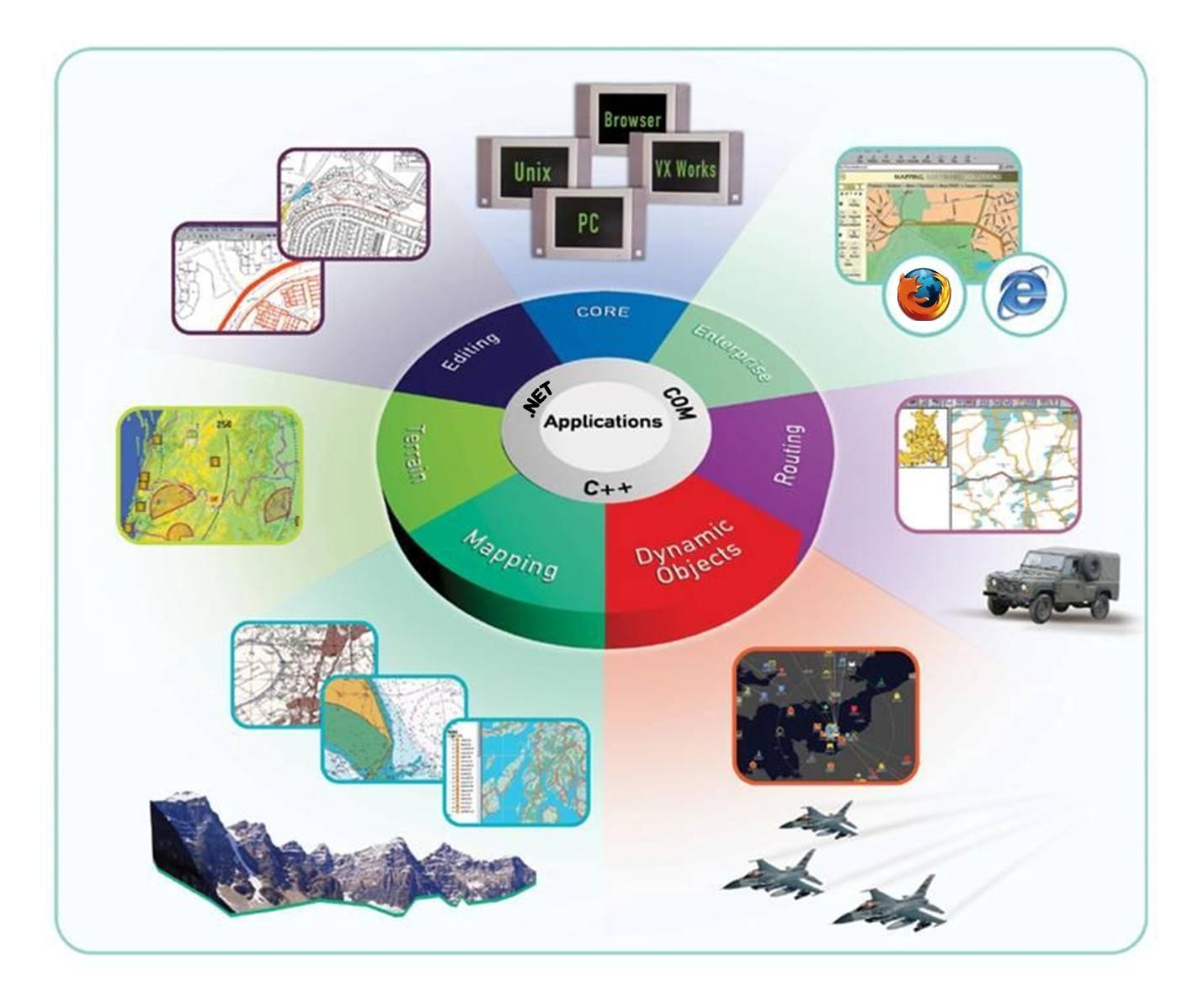
MapLink Studio
MapLink Studio is a sophisticated map processing tool. It allows fusion of a wide range of vector and raster map data with transformation and re-projection into a single integrated picture. As a standalone application, it is usually used off-line to create highly optimised maps. The generated maps are in turn used by user applications built with the suite of MapLink SDK components. MapLink Studio is also a COM Automation Server so can be used on-line and driven by a user application if necessary. More details of MapLink Studio may be found in the other documentation supplied with your MapLink Pro installation, notably the ‘MapLink Pro Studio Users Guide’.
Core SDK
The Core SDK is the basis of all MapLink Pro applications. Like all MapLink SDK’s, it is modular and flexible. Unlike many other products, MapLink does not dictate the architecture of your application. It is flexible enough to be easily integrated into whatever architecture best fits your application domain.
The Core SDK provides the following basic facilities to a MapLink application:
-
Visualisation of vector maps and overlays
-
Visualisation of raster maps and overlays
-
Loading of vector and raster data
-
A suite of vector geometric primitives
-
Access to attributes stored within maps generated by MapLink Studio.
-
Management of configuration information
-
Layering and decluttering of features
-
Access to the powerful coordinate system engine for map transformations
-
Control of Dynamic Projections for appropriate maps generated by MapLink Studio
-
Multi-threaded, progressive map display for smooth, responsive applications
-
Double buffering and other optimisation techniques
OpenGL Drawing Surface
The OpenGL drawing surface allows an application to take advantage of hardware acceleration to enable high performance visualisations on both desktop and mobile platforms.
The drawing surface provided by this SDK may be used as a drop-in replacement for the GDI and X11 drawing surfaces in many situations.
This drawing surface provides additional performance-oriented functionality including the ability to reproject the data in real time.
Direct Import SDK
The Direct Import SDK allows an application to load a wide variety of raster and vector data formats at runtime in a scalable and performant manner.
This SDK provides the ability to reproject data to the specified output coordinate system along with various vector and raster processing options.
Many of the options and concepts used by the Direct Import Layer are like those in MapLink Studio.
This includes the ability to export a feature rendering configuration from MapLink Studio in order to style vector data within the Direct Import Layer.
Tracks SDK
The Envitia Tracks SDK provides simple map display and navigation using tracks functionality through a .Net and C++ API.
The Tracks SDK is appropriate for customers who wish to deliver MapLink’s highly regarded performance and spatial data visualisation capabilities.
Features include support for:
-
Visualisation of real-world entities through Track Display Manager(s).
-
Track styling using application-defined symbols or using APP6A and 2525B symbology.
-
Track Level of Detail (LOD) visualisations.
-
History: The ability to display tracks at any time in the past.
-
Track history point trails.
-
Direction indicators.
-
Visibility of tracks.
-
Track selection.
Dynamic Data Object SDK
The Dynamic Data Object SDK allows developers to create fully dynamic overlays within a MapLink application. Each object within this overlay can have application specific data associated with it through custom derivations of the base class. The architecture splits the real-world Data Object from the visualisation, allowing the same object to be displayed in different ways and in different positions according to application specific rules.
MapLink automatically manages the creation and destruction of the Display Objects that visualise the real-world Data Objects. By default, you have access to the underlying MapLink Rendering Engine used to draw the maps, but if required, you can also override the draw routines allowing any application specific optimisations or features to be employed.
Editor SDK
The Editor SDK provides facilities for the interactive creation and manipulation of vector overlays. It provides a suite of interactive operations, a customisable operation management interface and components that allow for application specific specialisation of existing operations. In addition, there are components for new application specific operations. The management layer allows all operations to interact with the underlying map or other vector data.
Terrain SDK
The Terrain SDK provides fast access to layered terrain data that has been prepared through MapLink Studio. The methods on the Terrain Database object allow for query of spot, line and area height information making fast terrain calculations straightforward.
The SDK also allows for generation of contour lines or polygons from an arbitrary data source. Rendering of this contour information is fully controlled by the application.
MapLink 3D Earth SDK
For software development teams who want to develop and augment high performance three dimensional (3D) displays into their situational awareness mission systems, the MapLink Earth SDK is a software development kit that leverages the highly performant, mature MapLink API and geospatial capabilities of the MapLink software suite with the 3D visualisation capabilities of osgEarth.
Envitia’s MapLink Earth SDK provides an API very similar to the legacy MapLink 3D API. Its current capabilities include:
-
Applying MapLink’s terrain model to 3D model topology;
-
Draping MapLink’s 2D map layers over terrain;
-
MapLink Tracks with optional altitude dimension;
-
Billboarded icon symbology.
The MapLink Earth SDK provides the following functionality:
-
Draping of MapLink 2D data layers (TSLMapDataLayer, TSLLatLongGridDataLayer, TSLStandardDataLayer) over a 3D terrain;
-
Loading of terrain from MapLink Terrain Databases;
-
Control of the 3D camera, in the style of the TSL3DCamera class;
-
Display of 3D geometry/extruded 2D geometry;
-
Visualization of tracked objects as billboarded 2D symbols.
The MapLink Earth SDK is provided as a shared library and header files. The MapLink Earth SDK introduces a new abstract base class (TSLDrawingSurfaceBase) that supports functionality common to both 2D and 3D drawing surfaces. Abstracted functionality includes general layer management principles, support for 2D layers, and other similar operations.
In 2D, manipulations to the map are performed directly on the map - rotation, panning, zooming, etc. In 3D, the canonical implementation is not to manipulate the scene, but instead to alter the viewpoint onto the scene via a camera construct, representing the viewer position and orientation. The camera can pan, tilt and zoom in response to any input desired by the developer.
The ability to chroma-key the 3D scene over a video feed (or any other alternative backdrop) is supported by rendering the scene with a solid, configurable background colour.
Applications can use the SDK to display multiple surfaces using the same shared or discrete data objects, which may be configured with different cameras and visualization parameters.
The SDK supports display of tracked objects as 2D billboards. Rendering can be defined by MapLink vector entities or symbols, MapLink raster symbols and rasterized MapLink military symbols. Track objects provide an elevation dimension to support positioning of the object on or above ground.
OWSContext SDK
The OWSContext SDK allows a User to read, analyse, and display OWSContext documents within MapLink.
This SDK can read several offering types from an OWSContext document and provides a plugin interface to allow other offering types to be integrated with the SDK.
-
GML
-
WMS
-
WMTS
MapLink OGC Services
The MapLink OGC Services SDK should be used to construct one of the OGC Services that MapLink implements. Currently MapLink supports the following OGC Service implementations:
-
The Web Map Service (WMS)
-
The Web Processing Service (WPS)
The Web Map Service
The MapLink Web Map Service (WMS) provides a framework for serving maps across the internet using standard OGC protocols. The MapLink WMS supports all versions of the OGC Specifications including the latest 1.3.0 version.
The Web Processing Service
The MapLink Web Processing Service (WPS) provides a framework for geospatial web-services in accordance with version 1.0.0 of the OGC specification. The MapLink WPS framework provides the ability to deploy a general purpose “process” via the WPS so that a compatible client can utilise it across a network or the Internet. A “process” could for instance be an operation that converts geospatial data from one format to another, but in truth could be any type of operation that takes zero or more inputs and returns one or more outputs.
GeoPackage SDK
The GeoPackage SDK allows the user to read, analyse and display data from GeoPackage data files.
A GeoPackage is a platform-independent SQLite database schema for storing and transferring geographic vector features and image tiles. The schema contains specified definitions, integrity assertions, format limitations and content constraints.
A GeoPackage may be “empty” (contain user data table(s) for vector features and/or tile matrix pyramids with no row record content) or contain one or many vector feature type records and/or one or many tile matrix pyramid tile images. GeoPackage metadata can describe GeoPackage data contents and identify external data synchronisation sources and targets. A GeoPackage may contain spatial indexes on feature geometries.
Spatial SDK
The Spatial SDK, also known as the LandLink SDK, is formed of two main components.
The first component comprises a set of specialised operations built upon the basic Editor SDK. These operations employ powerful spatial analysis techniques to allow construction of vector data derived from the underlying map. Other custom operations construct specialised graphical primitives especially suited to the Land Registration market.
The second component of the Spatial SDK is a suite of configurable utility classes that provide further map data analysis tools for the automatic construction of Land Registration polygons. Combined with access to address databases such as QuickAddress, this provides a powerful batch processing solution.
The Spatial SDK has also been enhanced with the ability to identify and process self-contained ‘islands’ of changed data, where an island is defined as being a contiguous set of features.
CADRG Exporter SDK
The CADRG Exporter SDK provides the ability to incorporate the generation of CADRG and CIB within an application using MapLink.
GML SDK
The GML SDK provides the ability to both read and write OpenGIS® Geography Mark-up Language (GML) version 3.1.1 application schemas and instance data which conform to the Simple Feature Profile Level 0 (SF-0).
S63 SDK
The S63 SDK allows an OEM to develop an IHO compliant S63 application.
Please refer to the “MapLink S63 SDK Developers Guide”.
Deprecated SDKs
3D SDK
Please note that the deprecated Envitia 3D SDK is no-longer under development. It has been superseded by the MapLink Earth SDK, see Section 2.9.
The 3D SDK extends the capabilities of the Core SDK by allowing users to be immersed in rich geospatial models. The architecture of the 3D SDK is very flexible and parallels that of the existing 2D Core SDK - thus maximising reuse of current MapLink experience. Standard MapLink concepts such as Drawing Surfaces, Data Layers, Terrain Databases and Entities are extended into the 3D space. 2D or 3D Data Layers may be used interchangeably across 2D or 3D Drawing Surfaces - 2D layers may be draped over height fields when displayed on 3D Drawing Surfaces, whilst 3D layers are displayed in plan view on 2D Drawing Surfaces. The Data Layer concept has been extended to allow Terrain Data Layers which are added to the 3D Drawing Surface to provide height information.